
Receipts have a habit of ending up everywhere: crumpled in a wallet, tucked in a car visor, buried in email or lost in a shoebox under the desk. For most of the year that seems harmless. Then tax season arrives, or a client asks about a reimbursable expense, or your accountant wants backup for a deduction, and you spend hours digging through piles trying to reconstruct what you spent and why.
This guide shows you how to organize business receipts and expenses with a simple system that takes minutes a week. You will learn what a useful receipt record includes, how to capture paper and digital receipts as they arrive, how to set up categories that match your bookkeeping, how to handle mileage and mixed-use purchases, and how to store and eventually dispose of records safely. It is general guidance; your accountant can tell you exactly what your situation requires.

Why receipt organization matters
- Deductions you can support. Business expenses generally need records showing what you paid, when, to whom and for what business purpose.
- Accurate books. Matching receipts to bank and card transactions keeps your financial reports honest and useful.
- Faster tax prep. Organized records mean fewer questions from your accountant and fewer billable hours.
- Clean reimbursements. Clients, partners and employees get repaid correctly when every expense has backup.
- Better decisions. When expenses are categorized, you can see where the money goes and what to cut.
What a complete receipt record includes
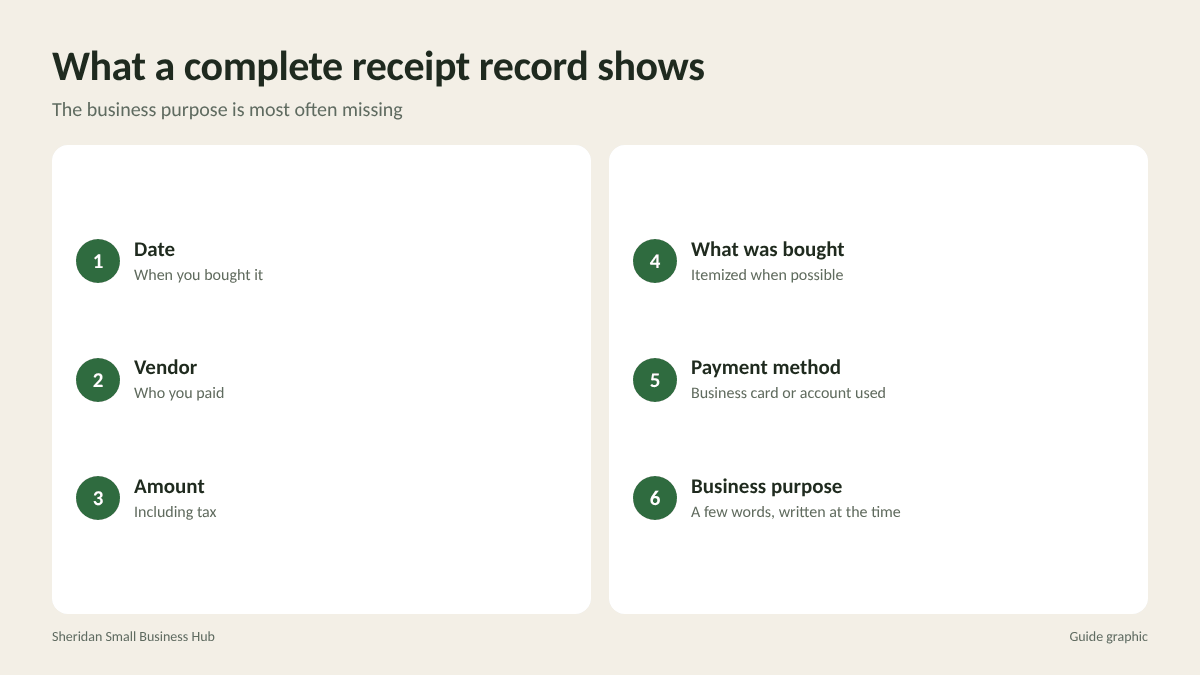
A receipt alone does not always tell the whole story. For each expense, make sure your records show:
- Date of the purchase
- Vendor name
- Amount, including tax
- What was bought, itemized when possible
- Payment method, such as the business card or business account it was paid from
- Business purpose, in a few words, such as “printer toner for office” or “lunch with client J. Ramos to discuss renewal”
The business purpose is the piece most often missing. Write it on the receipt or in the notes field of your expense app at the time of purchase, while you still remember.
Step 1: Separate business and personal spending
The single best thing you can do for clean records is to use a dedicated business bank account and a business credit card for business expenses only. When personal and business purchases mix on the same card, every statement becomes a sorting project, and it is harder to show which costs were truly business.
If a personal card is used for a business purchase in a pinch, record it right away and reimburse yourself from the business account with a note that matches the receipt.
Step 2: Capture receipts the moment you get them
The secret to receipt organization is not a better filing cabinet. It is capturing each receipt within a day, before it disappears.
Paper receipts
- Photograph or scan it with a receipt or accounting app as soon as you get it.
- Make sure the vendor, date, amount and items are readable. Thermal paper receipts fade over time, so a scan is often the only lasting copy.
- Add the category and business purpose in the app.
- Drop the paper into a single “to file” envelope or tray, then file or securely dispose of it according to your system.
Email and digital receipts
- Create a dedicated email folder, such as “Receipts 2026,” and move receipts there immediately.
- Better still, forward them to your accounting software’s receipt address if it offers one.
- Download PDF invoices from vendor portals monthly, since some portals only keep documents for a limited time.

Step 3: Use categories that match your books
Your receipt categories should match the expense categories in your accounting software, which in turn should match how your accountant prepares your return. Common small business categories include:
- Advertising and marketing (printing, ads, sponsorships)
- Office supplies
- Software and subscriptions
- Shipping and postage
- Travel
- Meals with a business purpose
- Vehicle expenses
- Professional services (legal, accounting, consultants)
- Rent and utilities
- Equipment and repairs
- Insurance
Keep the list short enough to remember; ten to fifteen categories cover most small businesses. Avoid a catch-all “miscellaneous” category. If something does not fit, ask your bookkeeper where it belongs and add a category if the expense will recur.
Step 4: Reconcile weekly or monthly
Reconciling means matching each bank and card transaction to a receipt and a category. Set a recurring 20 to 30 minute block, weekly if you have many transactions or monthly if you have few.
- Open your accounting software’s bank feed.
- Match each transaction to its captured receipt.
- Confirm or correct the category.
- Flag any transaction without a receipt and track it down while it is recent.
- Note any personal charges on business accounts and record them correctly.
Missing receipts are much easier to replace within a few weeks. Many vendors can email a copy, and most online orders can be reprinted from your account history.
Step 5: Track mileage and mixed-use expenses
Vehicle and home-office expenses often need more than a receipt.
Mileage
If you use a personal vehicle for business, keep a log of each business trip: date, starting point, destination, business purpose and miles driven. A mileage tracking app can do this automatically. The IRS publishes a standard mileage rate each year; look up the current rate on the IRS website rather than relying on last year’s figure.
Worked example: you drive 14 miles round trip to a client, 9 miles round trip for a supply run and 22 miles round trip to a networking event in one week. Your weekly business mileage is 14 + 9 + 22 = 45 miles. Over 48 working weeks at that pace, that is 45 x 48 = 2,160 business miles, a figure worth documenting carefully.
Mixed-use items
For a phone or internet plan used for both business and personal purposes, keep the bills and a note of how you estimate the business share. Your accountant can advise on what is reasonable.

Step 6: Store records and know when to dispose of them
Organize stored records by year, then by category or month. A simple digital structure works well: Finance > 2026 > Receipts > 01-January, and so on. Back up the folder automatically.
Keep records for as long as they may be needed to support your tax return and business decisions. The IRS provides general guidance on how long to keep records, and some situations require longer periods, so confirm with your accountant. When paper copies are no longer needed, or once you have reliable scans your accountant accepts, shred them rather than recycling them. Receipts can show card digits, signatures, addresses and account details.
A five-minute weekly habit
If the full system feels like a lot, start with one small routine. Every Friday, empty your wallet, car and bag of receipts, photograph each one into your app with a category and purpose, move any receipt emails into your receipts folder, and drop the paper into the month’s envelope. That habit alone prevents most year-end scrambles, and it gives you a clear picture of spending while it is still fresh enough to act on.
Frequently asked questions
Do I need to keep paper receipts if I scan them?
In many cases clear digital copies are acceptable, but confirm with your accountant before discarding originals, especially for large purchases.
What if I lose a receipt?
Ask the vendor for a copy, check your online order history or email, and keep the bank or card statement showing the charge, along with a written note of the business purpose.
How often should I organize receipts?
Capture each receipt the same day, and reconcile transactions weekly or monthly depending on how many you have.
Are bank statements enough proof of an expense?
A statement shows that you paid, but not always what you bought or why. Keep receipts or invoices that show the details, plus a note of the business purpose.
Setting up your receipt system?
Folders, envelopes, labels and storage boxes make a paper backup easy to keep tidy. The Postal Spot stocks office supplies in Houston for small businesses getting their records in order.