
Every office produces a steady stream of paper: printouts, mail, old drafts, receipts, sticky notes and catalogs. Most of it ends up in one bin by the printer, and nobody stops to think about what is in there. That is where the risk comes in. A recycling bin full of unshredded invoices, payroll stubs and customer forms is an easy target for anyone who wants personal or business information. So is it safe to recycle office paper? Often yes, but only after you sort out the paper that should be shredded first.
This guide gives you a simple way to decide what can go straight to recycling and what must be shredded, a sorting system for your office, and a few habits that keep sensitive paper out of the wrong bin. It also covers what happens to shredded paper and when to use a shredding service instead of your own machine.
Why the recycling bin is a security risk
Paper in a recycling bin is usually collected, stored and transported without much protection. Bins sit in hallways or behind buildings, and dumpsters are often accessible to anyone. Once paper leaves your office, you have no control over who sees it. The kinds of information most often exposed this way include:
- Names, addresses, phone numbers and dates of birth of customers and employees
- Social Security numbers and tax ID numbers
- Bank account and credit card numbers, even partial ones
- Signatures that could be copied
- Pricing, contracts and supplier details a competitor would value
- Medical, legal or insurance information
Identity thieves and fraudsters do not need a whole document. A name, an address and an account number from a single statement can be enough to cause problems.
Is it safe to recycle office paper? A simple test
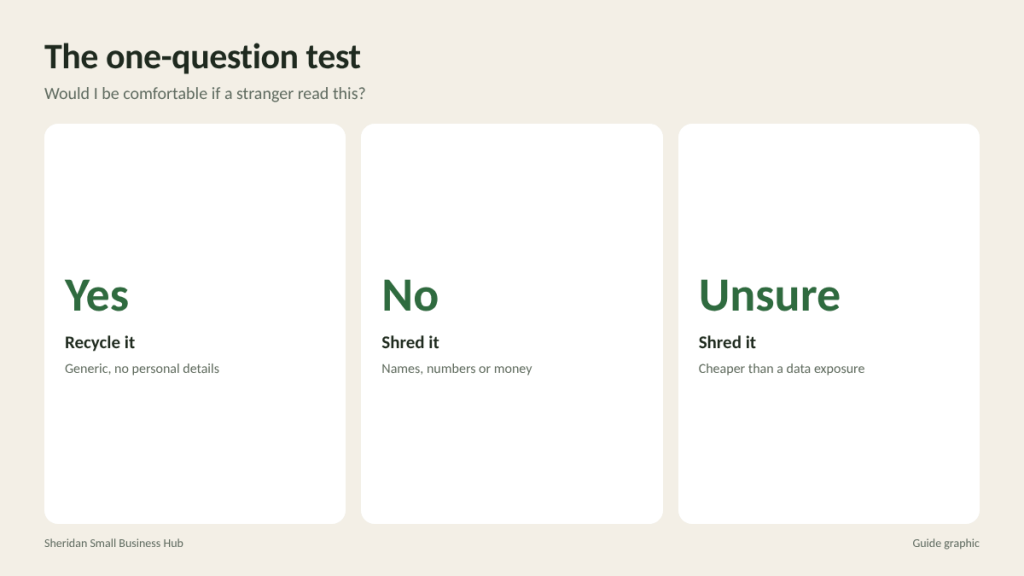
Before anything goes in the recycling bin, ask one question: Would I be comfortable if a stranger read this?
- If yes, recycle it.
- If no, or if you are not sure, shred it.
That one rule covers most situations. When in doubt, shred. The cost of shredding one extra page is tiny compared with the cost of exposing someone’s personal information.
Safe to recycle
These items generally do not contain sensitive information and can go in the recycling bin, as long as your local program accepts them:
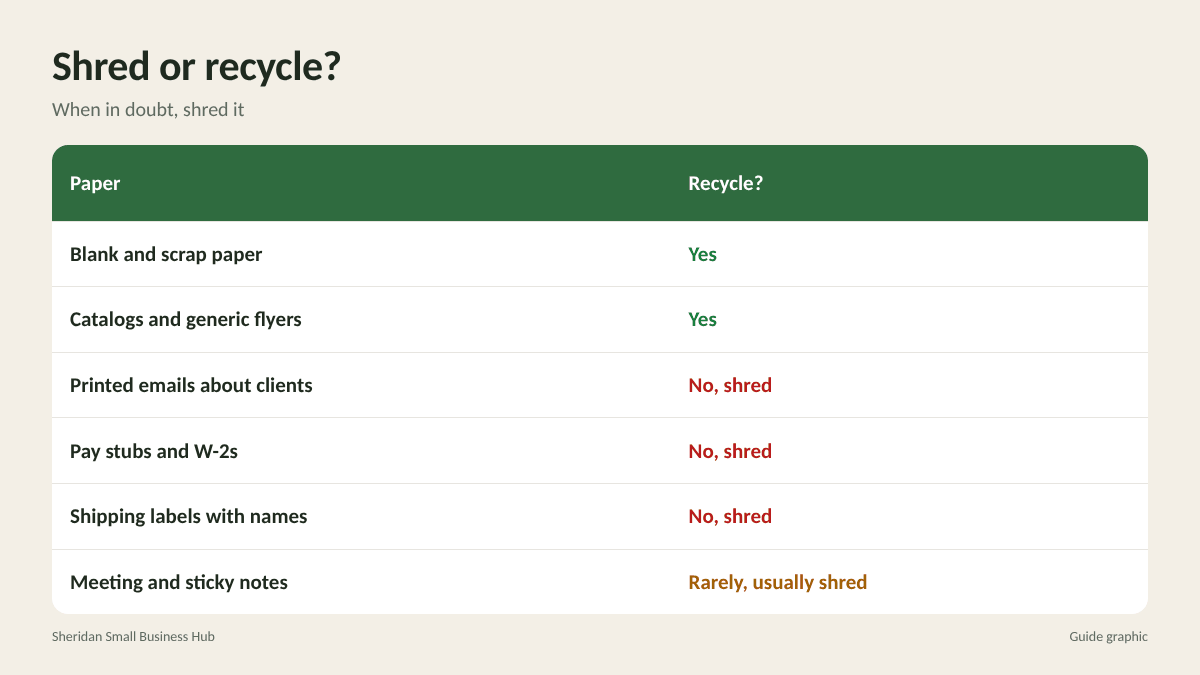
- Blank paper and scrap paper with no writing
- Generic marketing materials, flyers and brochures
- Catalogs, magazines and newspapers
- Printed web pages and articles with no notes about clients or staff
- Envelopes with no name, address or account information (remove any window film if your program requires it)
- Packaging inserts and generic product manuals
- Corrugated cardboard and paperboard boxes, with labels removed
Always shred
These items should never go into a recycling bin whole:
- Financial documents: bank and credit card statements, canceled checks, deposit slips, invoices, receipts with card numbers, and loan documents
- Employee records: pay stubs, W-2s, W-4s, I-9s, applications, resumes, performance reviews and anything with Social Security numbers
- Customer records: order forms, contracts, applications, account statements and anything with personal details
- Tax documents once their retention period has passed
- Legal and medical papers of any kind
- Business confidential information: pricing sheets, bids, strategic plans, vendor contracts and internal reports
- Login details: anything with passwords, PINs, access codes or account numbers written on it
- Shipping labels and packing slips with names and addresses
- Mail addressed to employees or customers, such as returned mail or credit offers
The gray areas
Some paper falls between the two lists. A few common examples and how to handle them:
- Printed emails: recycle if generic; shred if they mention clients, prices, staff or account details.
- Meeting notes and sticky notes: often contain names, numbers and plans. Shred them.
- Drafts and misprints: treat them like the final document. A misprinted invoice is still an invoice.
- Old business cards: recycling is generally fine for your own outdated cards. Cards collected from contacts are usually low risk, but shred them if they include personal notes.
- Calendars and planners: shred if they contain appointments with names or addresses.
Set up a two-bin system
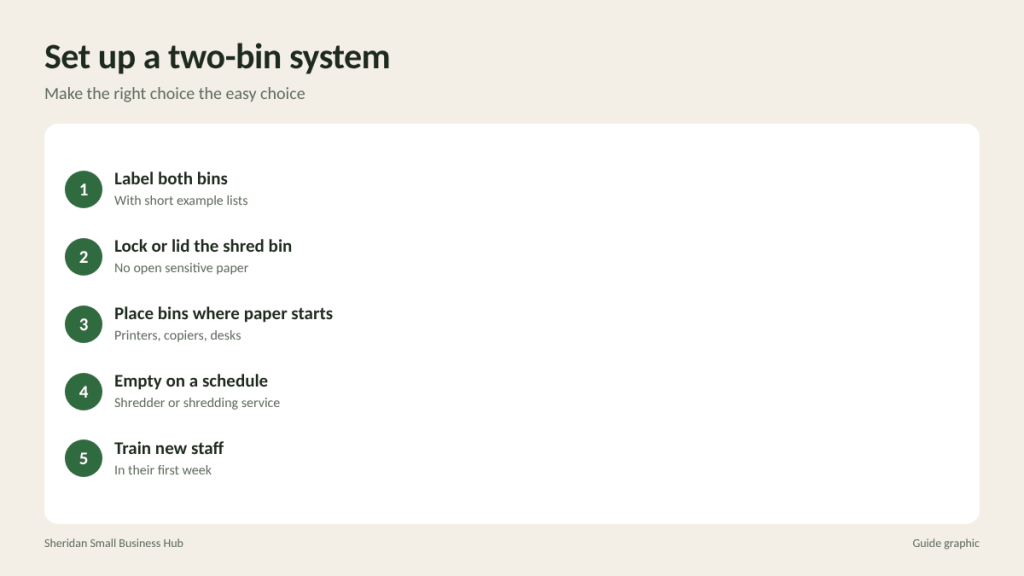
The easiest way to make the right choice automatic is to place a locked or lidded shred bin right next to every recycling bin, especially by printers, copiers and desks that handle customer or financial paper.
- Label both bins clearly, with a short list of examples on each. “Shred: anything with names, numbers or money” works well.
- Use a locked shred console or a closed box so sensitive paper is not sitting in an open bin.
- Place shred bins where paper is created, not in a far corner. If shredding is inconvenient, people skip it.
- Empty the shred bin on a regular schedule, either by running it through your shredder or taking it to a shredding service.
- Train new staff on the rule during their first week.
Do not forget remote and home offices
Employees who work from home often print documents with customer or company information, then toss them in a household recycling bin. Set a clear expectation: sensitive work paper is either shredded at home with a cross-cut shredder or brought back to the office shred bin in a sealed envelope. If staff regularly handle sensitive paper at home, consider providing a small shredder. The same rule applies to owners who run part of the business from the kitchen table.
Your shredder or a shredding service?
An office shredder works well for small, daily amounts. Choose a cross-cut or micro-cut model, because strip-cut shredders produce long strips that can be pieced back together. Office machines have limits, though: many need staples and clips removed, can overheat after a few minutes of continuous use and are slow for large volumes.
Choosing an office shredder
If you buy a machine for daily use, check a few specifications before you choose:
- Cut type: cross-cut for general office paper, micro-cut for highly sensitive records.
- Sheet capacity: how many sheets it can take at once. Feeding more than the rated amount causes jams.
- Run time: how many minutes it can run before it needs to cool down. Light-duty models may only run briefly.
- Bin size: a larger bin means fewer interruptions to empty it.
- What else it accepts: some models handle staples, credit cards or CDs; others do not.
Keep the shredder oiled according to the manufacturer’s instructions and empty the bin before it is full, which helps prevent jams.
A shredding service makes more sense when:
- You are clearing out old files after a records purge
- Your shred bins fill faster than your machine can handle
- You are shredding very sensitive records and want them handled in a secure process
- You want to save staff time
What happens to shredded paper?
Shredded paper is still paper, and it can often be recycled. However, many curbside programs handle it differently from whole sheets, because small pieces can be hard to sort. Some ask that shredded paper be placed in a clear or paper bag, and some do not accept it. Check your local recycling program’s rules. Many professional shredding services recycle the shredded material as part of the process, which takes care of the question for you.
Frequently asked questions
Can I recycle paper with my company letterhead?
Blank letterhead is usually fine to recycle. Letters with names, account details or business matters should be shredded.
Is it safe to recycle envelopes?
Blank envelopes, yes. Envelopes showing a name, address or account number should be shredded or have that section removed and shredded.
Is strip-cut shredding secure enough?
It is the least secure type. For anything sensitive, a cross-cut or micro-cut shredder or a professional service is a better choice.
Can shredded paper go in my recycling bin?
It depends on your local program. Some accept it bagged, some do not accept it at all.
Shred bin overflowing?
Skip the jams and bring it to The Postal Spot for walk-in document shredding in Houston, with no appointment needed.